×

043 411 06 80 | stock CH | Twint | 14j Droit de retour

Claviers à effet Hall : Sélection rapide de gâchettes et de modèles

Un clavier à effet Hall peut mesurer jusqu’où vous appuyez sur une touche sur les modèles supportés. Cela vous permet de définir le point de déclenchement. Que cela ait un impact pour vous dépend de ce que vous faites avec le clavier.
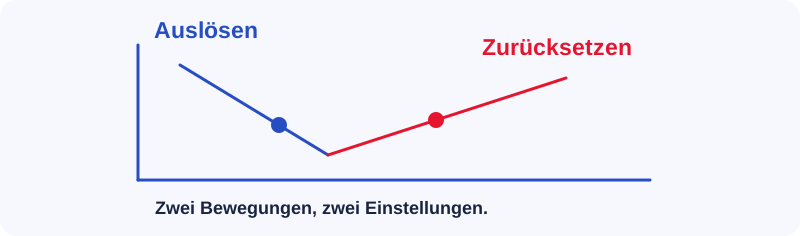
Schematische Darstellung: Auslösen, Zurücksetzen, Zwei Bewegungen, zwei Einstellungen.

Quelle option vous convient le mieux ?

Compact avec configuration suisse

Keychron K2 HE

Choisis-le si tu veux combiner Rapid Trigger, une série F et ISO-CH. La version liée possède des interrupteurs magnétiques.

Bureau et occasionnellement de la scène

Keychron V1 Max

Choisissez le V1 Max mécanique si un point de pression clair et des interrupteurs standards sont plus importants pour vous qu’un point de déverrouillage réglable.

Point de déclenchement et déclenchement rapide

Le point de détente détermine jusqu’où vous devez appuyer. Déclencheur rapide peut réinitialiser le bouton lorsque vous le soulevez sans avoir à revenir d’abord à un point fixe. C’est particulièrement utile lors de changements de direction rapides.

Défini différemment pour le jeu et l’écriture

Lorsque vous tapez, commencez par un réglage moins sensible. Si vous voulez déclencher tôt en jouant, testez d’abord le changement sur quelques touches. Des réglages trop sensibles peuvent provoquer des entrées involontaires.

Comment comparer les modèles

Vérifiez d’abord la disposition et le format. Ensuite, comparez le configurateur, les options de réglage et les interrupteurs magnétiques supportés. Deux claviers magnétiques peuvent nécessiter des interrupteurs très différents. Vérifiez le design exact sur la page du modèle.


Accordéons stylisés

3 accordéons prédéfinis, vous pouvez facilement les personnaliser en utilisant le back-office.

Accordéons vous permet de basculer le contenu sur vos pages.
Sample image

If you’re after only one item, simply choose the ‘Buy Now’ option on the item page. This will take you directly to Checkout.

If you want several items, use the ‘Add to Cart’ button and then choose ‘Keep Browsing’ to continue shopping or ‘Checkout’ to finalise your purchase. You can go back to your cart at any time by clicking on the shopping cart icon at the top right side of the page.

Lorem ipsum dolor sit amet, consectetur adipiscing elit. Quod cum dixissent, ille contra. Aliena dixit in physicis nec ea ipsa, quae tibi probarentur; Ille vero, si insipiens-quo certe, quoniam tyrannus -, numquam beatus; Haec para/doca illi, nos admirabilia dicamus. Duo Reges: constructio interrete. Nam quid possumus facere melius?

Ut pulsi recurrant? Animi enim quoque dolores percipiet omnibus partibus maiores quam corporis. Haec bene dicuntur, nec ego repugno, sed inter sese ipsa pugnant. Quae qui non vident, nihil umquam magnum ac cognitione dignum amaverunt. Eorum enim omnium multa praetermittentium, dum eligant aliquid, quod sequantur, quasi curta sententia; Eaedem res maneant alio modo.

At Checkout, we’ll ask you for some account information before completing your purchase:

  • If you already have an Envato account, simply sign in to pre-fill your account information.
  • If you don’t have an Envato account, follow the steps to sign up.

Select your preferred payment option and enter your payment details. Take a moment to review your order before finalising your purchase.

If you do not wish to set up an Envato account, you can complete your purchase using guest checkout. Please note: Guest checkout is only available on AudioJungle and 3DOcean.

When you pay with prepaid Envato Credit, you’ll avoid the handling fees that apply PayPal and Credit Card purchases.

To pay with Envato Credit either:

  • Purchase credits by hovering the mouse over your username at the top of the screen and click 'Make a Deposit' from the drop down menu. Once you have made a deposit, choose your item(s) and select ‘Envato Credit’ as your payment option at Checkout, or
  • Select the item(s) you wish to buy and choose 'Add Credit to Buy Now / Checkout' to deposit Envato Credit and finalise your purchase.

You can use the “Buy Now” option to purchase a single item, or the “Add to Cart” feature to purchase multiple items. Once you have selected the item(s) you wish to purchase, go to Checkout, enter your email address and select “Checkout as Guest”.

You must ensure that your email address is valid and correct. Your purchase code details, invoice and a link to download your item will be sent to the email address you provide.

Fill in your name and billing details, then select your preferred method of payment. Please take a moment to make sure your order and your personal details are correct before finalising your purchase.

You can create your Envato account at any time and it only takes a few moments.

You’ll see a link to create your account in your post purchase confirmation email. Simply click on “Create an Account!” and you will be directed to the Sign in page where you can choose your username and password.

Alternatively, click here and select “Create an Envato Account”. Enter the same name and email address that you used for your guest purchase to create your account.

Item support does not include services to modify or extend the item beyond the original features, style and functionality described on the item page. For customization services that will help you tailor the item to your specific requirements, we recommend contacting the author to see if they privately offer paid customization services or checking out the great service providers on Envato Studio.

  • Installation of the item
  • Hosting, server environment, or software
  • Help from authors of included third-party assets

If you would like some more help with your website we can put you in touch with the right professional for your requirements.

Visit Envato Studio where you will find talented designers, content writers and many other experts who can help you.

You can also find any assets you may need from one of our markets here market.envato.com

You can create your Envato account at any time and it only takes a few moments.

You’ll see a link to create your account in your post purchase confirmation email. Simply click on “Create an Account!” and you will be directed to the Sign in page where you can choose your username and password.

Alternatively, click here and select “Create an Envato Account”. Enter the same name and email address that you used for your guest purchase to create your account.

Item support does not include services to modify or extend the item beyond the original features, style and functionality described on the item page. For customization services that will help you tailor the item to your specific requirements, we recommend contacting the author to see if they privately offer paid customization services or checking out the great service providers on Envato Studio.

  • Installation of the item
  • Hosting, server environment, or software
  • Help from authors of included third-party assets

If you would like some more help with your website we can put you in touch with the right professional for your requirements.

Visit Envato Studio where you will find talented designers, content writers and many other experts who can help you.

You can also find any assets you may need from one of our markets here market.envato.com

If you’re after only one item, simply choose the ‘Buy Now’ option on the item page. This will take you directly to Checkout.

If you want several items, use the ‘Add to Cart’ button and then choose ‘Keep Browsing’ to continue shopping or ‘Checkout’ to finalise your purchase. You can go back to your cart at any time by clicking on the shopping cart icon at the top right side of the page.

At Checkout, we’ll ask you for some account information before completing your purchase:

  • If you already have an Envato account, simply sign in to pre-fill your account information.
  • If you don’t have an Envato account, follow the steps to sign up.

Select your preferred payment option and enter your payment details. Take a moment to review your order before finalising your purchase.

If you do not wish to set up an Envato account, you can complete your purchase using guest checkout. Please note: Guest checkout is only available on AudioJungle and 3DOcean.

When you pay with prepaid Envato Credit, you’ll avoid the handling fees that apply PayPal and Credit Card purchases.

To pay with Envato Credit either:

  • Purchase credits by hovering the mouse over your username at the top of the screen and click 'Make a Deposit' from the drop down menu. Once you have made a deposit, choose your item(s) and select ‘Envato Credit’ as your payment option at Checkout, or
  • Select the item(s) you wish to buy and choose 'Add Credit to Buy Now / Checkout' to deposit Envato Credit and finalise your purchase.

You can use the “Buy Now” option to purchase a single item, or the “Add to Cart” feature to purchase multiple items. Once you have selected the item(s) you wish to purchase, go to Checkout, enter your email address and select “Checkout as Guest”.

You must ensure that your email address is valid and correct. Your purchase code details, invoice and a link to download your item will be sent to the email address you provide.

Fill in your name and billing details, then select your preferred method of payment. Please take a moment to make sure your order and your personal details are correct before finalising your purchase.

Sample image

If you’re after only one item, simply choose the ‘Buy Now’ option on the item page. This will take you directly to Checkout.

If you want several items, use the ‘Add to Cart’ button and then choose ‘Keep Browsing’ to continue shopping or ‘Checkout’ to finalise your purchase. You can go back to your cart at any time by clicking on the shopping cart icon at the top right side of the page.

At Checkout, we’ll ask you for some account information before completing your purchase:

  • If you already have an Envato account, simply sign in to pre-fill your account information.
  • If you don’t have an Envato account, follow the steps to sign up.

Select your preferred payment option and enter your payment details. Take a moment to review your order before finalising your purchase.

If you do not wish to set up an Envato account, you can complete your purchase using guest checkout. Please note: Guest checkout is only available on AudioJungle and 3DOcean.

When you pay with prepaid Envato Credit, you’ll avoid the handling fees that apply PayPal and Credit Card purchases.

To pay with Envato Credit either:

  • Purchase credits by hovering the mouse over your username at the top of the screen and click 'Make a Deposit' from the drop down menu. Once you have made a deposit, choose your item(s) and select ‘Envato Credit’ as your payment option at Checkout, or
  • Select the item(s) you wish to buy and choose 'Add Credit to Buy Now / Checkout' to deposit Envato Credit and finalise your purchase.

You can use the “Buy Now” option to purchase a single item, or the “Add to Cart” feature to purchase multiple items. Once you have selected the item(s) you wish to purchase, go to Checkout, enter your email address and select “Checkout as Guest”.

You must ensure that your email address is valid and correct. Your purchase code details, invoice and a link to download your item will be sent to the email address you provide.

Fill in your name and billing details, then select your preferred method of payment. Please take a moment to make sure your order and your personal details are correct before finalising your purchase.

Fermer
Cliquez pour plus de produits.
Aucun produit n’a été trouvé.

Aide & FAQ

Paramètres

Menu